Does Maya Have a Modifier Stack?
Maya has no 3ds Max style modifier stack panel. Here is what it has instead, how to manage history and deformers, and a free way to get a stack.
If you are coming from 3ds Max, the Modify panel and its modifier stack are probably what you miss most. Short answer: Maya does not have a modifier stack panel. It has the same idea built from different parts, spread across a few windows.
What Maya has instead
Maya works non-destructively through construction history. When you bevel, smooth or extrude, Maya keeps that operation as a node on the object. Deformers such as Bend, Twist, Lattice, Cluster and Blend Shape chain one after another in a similar way.
You can see and change these nodes in a few places:
- Channel Box, Inputs: lists the history nodes and deformers on the selected object. Click one to edit its values.
- Attribute Editor: has a tab for each node in the chain.
- Node Editor or Hypergraph: shows the same nodes as a graph.
- Delete History and Bake Non-Deformer History: remove the nodes once you are done, the closest thing to Max’s Collapse.
Where it falls short of Max
The pieces are all there, but managing them is clumsy:
- There is no single panel that shows the whole stack for an object, top to bottom.
- There is no one-click on and off for each operation like Max’s eye icon.
- Reordering takes digging into the Inputs list or the graph, and it is easy to break something.
- There is no modifier list to add a Bend or a Bevel from one place.
- Instancing one modifier across several objects is not a simple option.
Getting a modifier stack in Maya
Modifier Stack for Maya adds the missing panel. It reads an object’s history and deformers and shows them as a Max style stack: add modifiers from a list, drag to reorder, switch each one on and off, instance them across objects and collapse the stack when you are done. It builds on Maya’s own nodes, so scenes still open and render without it.
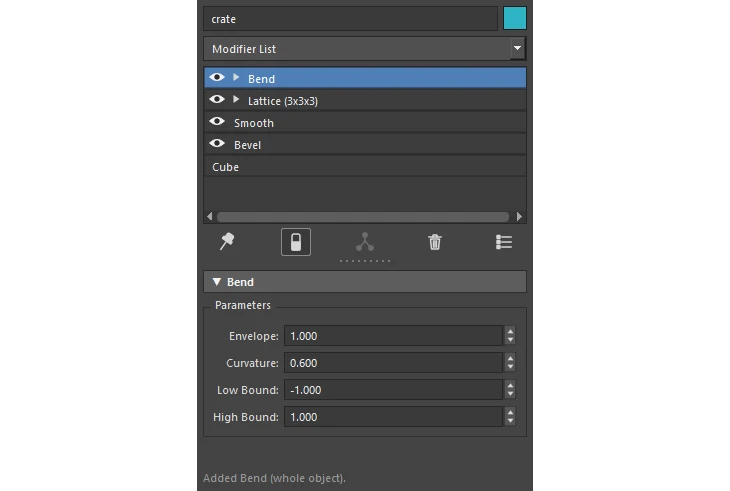
See Modifier Stack for Maya for the full feature list.
Working without one
If you stay with plain Maya, a few habits help:
- Keep history on while you model, and delete it at stable points so the node list stays short.
- Name or group deformers so you can find them in the Inputs list.
- Check deformer order after adding a new one, because the order changes the result.
- Work on a duplicate when you try reordering, and save first.
Related tool: Modifier Stack for Maya. A 3ds Max style Modify panel for Maya. Stack deformers and modifiers on a mesh, reorder them, switch them on and off, and keep the whole setup non-destructive.