Build Maya Materials From Any Texture Set, Across Arnold, Redshift and V-Ray
Build complete Maya materials from any PBR texture folder and move them between Arnold, Redshift and V-Ray. How it works, and how to request another renderer.
Setting up a PBR material by hand means the same chore every time: make the shader, create a file node for every map, set the color space, add a normal map node, wire it all up. Then a client asks for a different renderer and you do it again. Material Generator is built around one idea: the textures are the source of truth, and the renderer is just an output choice.
Plug in any texture set
Material Generator doesn’t care where the textures came from. Point it at a folder, and it scans that folder and its subfolders, groups the files into materials by name, and builds one complete material per set.
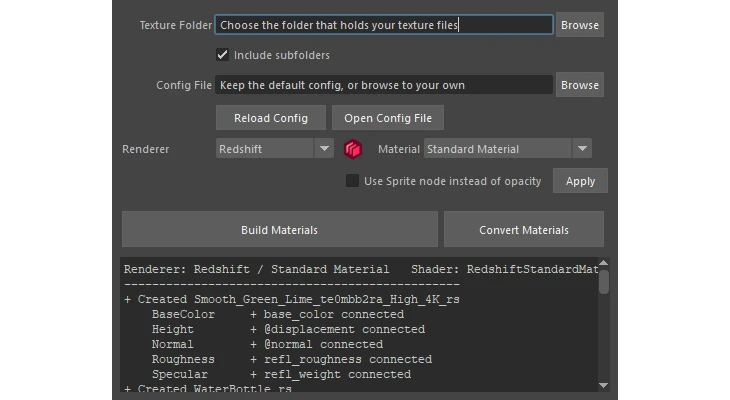
It matches files by the keyword at the end of the name, the same way Substance Painter exports them. Wood_Oak_BaseColor.png and Wood_Oak_Roughness.1001.exr both become part of a material called Wood_Oak. That works for textures from Substance, scanned libraries, or anything you’ve named the same way. It recognizes BaseColor, Albedo and Diffuse, Metalness, Roughness, packed ORM maps, Specular, Opacity, Emissive, Subsurface, Normal and Height or Displacement.
A few things it takes care of so you don’t have to:
- Normal maps and displacement are built the way each renderer expects, not as a generic file node.
- UDIMs (1001, 1002 and so on) and packed maps such as ORM, where one texture feeds roughness and metalness, are handled automatically.
- Run it again after adding more maps and it only fills in what is missing.
If your naming doesn’t match, you don’t have to rename a folder of files. On first launch the tool writes a config file, and you can edit the texture keywords and the attributes they connect to. The comments inside the file explain the format.
One set of textures, any renderer
The same folder can be built in Arnold, Redshift or V-Ray. You choose the renderer in the window, and the tool uses that renderer’s own nodes and settings. For Redshift that includes Standard, OpenPBR and Legacy materials, plus optional Round Corners on normal maps.
That also makes it easy to move a scene. Select materials, or convert the whole scene, from one renderer to another. Texture connections and values are kept, and one Ctrl+Z undoes the whole conversion if it isn’t what you wanted.
What has and hasn’t been tested
Material Generator supports Maya 2025, 2026 and 2027, and it has been tested with Arnold and Redshift.
V-Ray has not been tested in a copy of V-Ray. Its support is built from V-Ray’s published attribute names and naming conventions, so in theory it should work. If you use V-Ray, try it and send what works and what breaks to support@LPTools.store. That feedback is how it gets properly tested.
Need another renderer?
The tool is open to more renderers. If you work in one that isn’t listed, email support@LPTools.store with the renderer name and what you’d want from it. Requests from real projects are what decide what gets added next.
Getting it
See Material Generator and Converter for Maya for the full feature list and download, and the documentation for install steps, the naming rules and the config file.
Related tool: Material Generator and Converter for Maya. Build materials from textures and convert them between renderers.