GLB Bridge for Maya Documentation
Install GLB Bridge for Maya, import and export glTF and GLB files, restore quads, and use Draco, WebP and KTX2 compression.
Requirements
Maya 2025, 2026 or 2027. Tested in Maya 2025 and 2027. Maya 2026 runs the same Python as 2025.
Install
Pick one of the two ways.
A. Drag and drop (recommended)
- Unzip the whole download.
- Start Maya and drag
GLBBridge_drag_and_drop_install.pyinto a viewport.
GLB Bridge opens, its GLB button goes on the LP Tools shelf, and it gets an entry in the LP Tools menu. Click the button to import or export a .glb or .gltf file. The files also appear in Maya’s File > Import and Export menus. One install covers Maya 2025, 2026 and 2027. In another version, the button appears the first time you start it.
To remove it, choose LP Tools menu > GLB Bridge > Uninstall.
B. By hand, with two lines of Python
- Copy the whole
lp_glb_bridgefolder fromGLBBridge\python\py311(Maya 2025 or 2026) orGLBBridge\python\py313(Maya 2027) into your Maya scripts folder,Documents\maya\scripts. Also copylp_glb_bridge_translator.pyfromGLBBridge\plug-insintoDocuments\maya\plug-ins, and make that folder if it isn’t there. - Restart Maya, then run these lines in the Script Editor (Python tab):
import lp_glb_bridge
lp_glb_bridge.show()
To make a shelf button, select the lines and middle-mouse-drag them onto a shelf.
Update
Drag GLBBridge_drag_and_drop_install.py from the new download into Maya. It replaces the old version, including a copy you put in your scripts folder by hand. If you installed by hand, replace the files in Documents\maya\scripts and restart Maya. Your settings are kept either way.
Start here
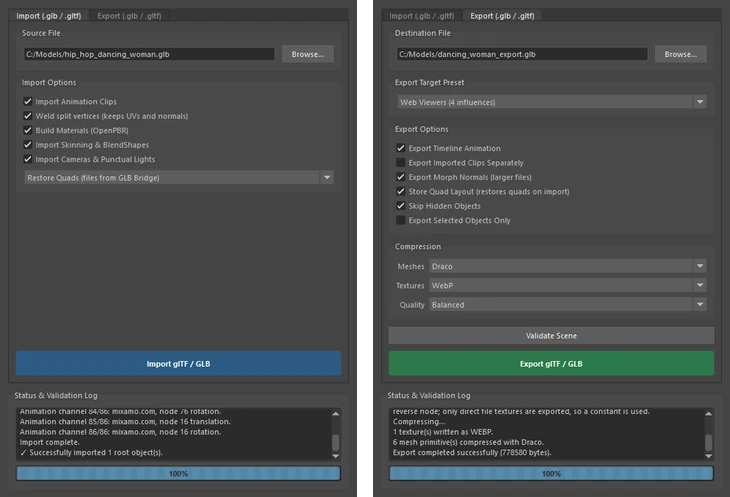
Click the GLB button on the LP Tools shelf, or open LP Tools menu > GLB Bridge. Pick a .glb or .gltf file on the Import tab, or choose a destination on the Export tab.
The installer also adds .glb and .gltf to Maya’s File > Import, Open and Export dialogs, under the file type “LP GLB Bridge”.
Import
- Materials: OpenPBR materials with base color, metalness, roughness, normal, emissive, opacity and ambient occlusion maps, texture transforms and wrap modes. Older spec-gloss files and the common KHR material extensions (clearcoat, sheen, transmission, volume, IOR, unlit) come in too. Textures are saved into the project’s sourceimages folder.
- Skins and blend shapes: joints, bind poses and weights become a Maya skinCluster, and morph targets become blend shapes with their names and default weights.
- Animation: every clip, with rotations unwrapped and blend shape weights keyed. Several clips are laid out one after another on the timeline.
- Cameras, lights and instances: perspective and orthographic cameras, point, spot and directional lights, and GPU-instanced meshes.
- Compressed files: Draco and meshopt compressed meshes, quantized meshes, and KTX2 (Basis Universal) and WebP textures, converted so Maya can use them.
- Quads come back: glTF only stores triangles, so exports record the original quads and n-gons and an import rebuilds them exactly. For files from other tools, an optional Guess Quads setting pairs flat, smooth triangles into quads.
- Clean meshes: split vertices are welded back together with UVs, normals, skin weights and morph targets kept, and flat-shaded models stay flat.
Restoring quads: Quads and n-gons you export come back as quads and n-gons when you import the file again, using Import tab > Restore Quads. For files from other tools, pick Restore + Guess.
Export
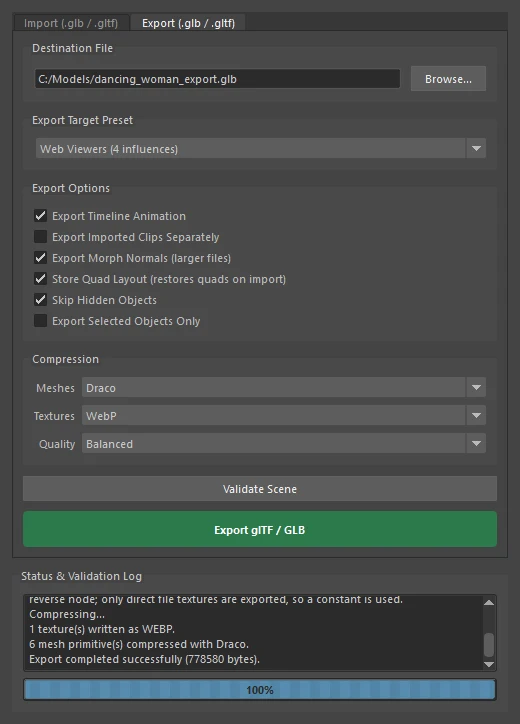
- Scene: meshes (triangulated, one primitive per material), hierarchy, pivots and Maya’s scene units, converted to glTF’s meters and Y up.
- Materials: Standard Surface, OpenPBR, Arnold, Redshift and the classic shaders. Separate roughness and metalness maps are packed into one image, and tangents are written for normal-mapped materials.
- Skins and blend shapes: exported from the rest pose, with a limit on influences per vertex (a Web Viewers preset keeps it at 4), and morph target normals.
- Animation: baked from the timeline, including IK, constraints and expressions. Imported clips can be exported back out as separate clips.
- Compression (optional): Draco meshes, and WebP or KTX2 (Basis Universal) textures, each with a Balanced, Smallest or Highest Quality setting. A skinned character with textures went from 4.3 MB to 0.8 MB in our test.
- Validate Scene: checks the scene before export. Every file the tool writes passes the Khronos glTF Validator with no errors.
In the Compression section on the Export tab you can switch on Draco, WebP and KTX2.
Checking your export
To validate what you export, run it through the Khronos glTF Validator.
Third-party code
The Draco, meshoptimizer, Basis Universal and zstd decoders are included under their own licenses. See lp_glb_bridge\vendor\THIRD_PARTY_NOTICES.txt in the module.
Need help? Email support@LPTools.store and include the details listed on the Support page.