fSpy Importer for Maya and 3ds Max Documentation
Install the free fSpy Importer for Maya or 3ds Max, import an .fspy project, and get a matched camera with the photo behind it and a projection material.
fSpy is free, open-source camera matching software by Per Gantelius. This importer is free and open source too, under GPL-3.0-or-later. It follows his official fSpy importer for Blender.
There is one free download for Maya and one for 3ds Max. This page covers both: Maya first, then 3ds Max.
Requirements
Maya 2025 or 2027 (Python 3).
Install
Pick one of the two ways.
Drag and drop. The free download on Gumroad comes with fSpyImporter_drag_and_drop_install.py. Unzip it and drag that file into a Maya viewport. The importer opens, and its FSPY button goes on the LP Tools shelf, with an entry in the LP Tools menu. To remove it, choose LP Tools menu > fSpy Importer > Uninstall.
By hand, with two lines of Python.
- Copy
lp_fspy_importer_maya.pyandfspy_icon_128.pnginto your Maya scripts folder,Documents\maya\scripts. The icon is optional and is the logo in the window. - Restart Maya, then run this in the Script Editor (Python tab):
import lp_fspy_importer_maya
lp_fspy_importer_maya.show()
To make a shelf button, select the lines and middle-mouse-drag them onto a shelf.
Upgrading from fspy_maya.py: the script was renamed to lp_fspy_importer_maya.py. A small fspy_maya.py still comes with it so old shelf buttons keep working. Copy both, or update the button to the lines above.
Import a project
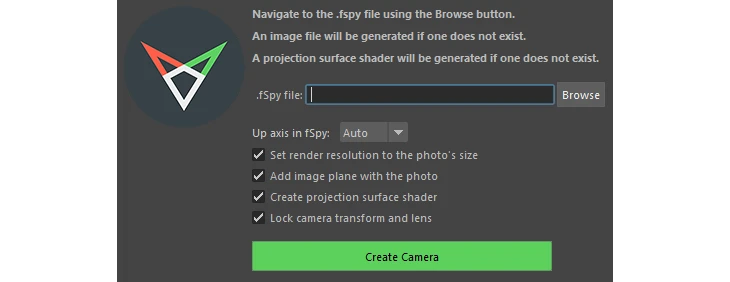
Pick a .fspy file in the window and import it. The importer creates:
- A matched camera with fSpy’s position, rotation and field of view. If you moved the principal point in fSpy, the film offset is set to match.
- An image plane showing the photo, pushed far behind the scene so it doesn’t hide your geometry.
- The render resolution set to the photo’s size.
- A projection shader, named
<name>_PROJ_mat, that projects the photo through the camera onto whatever you assign it to. If one with the same name already exists, it is reused and pointed at the new camera.
The photo stored inside the .fspy file is saved next to it, as a .jpg or .png. The whole import is one undo step.
Options
- Up axis: Auto picks fSpy’s up axis for you, or choose it yourself.
- True scale: if you set a reference distance in fSpy, the camera comes in at real-world scale in your scene’s units.
- Lock camera: locks the transform and lens so the match can’t be nudged by accident.
Without the window
lp_fspy_importer_maya.import_fspy(r"C:\path\to\shot.fspy")
No fSpy installed?
Camera Match for Maya does the whole match inside Maya and can save .fspy files.
3ds Max
The 3ds Max importer does the same job with a Physical Camera and the photo as the viewport background. Get it free on Gumroad. It needs 3ds Max 2025 or newer (Python 3 with PySide6) and is tested in 3ds Max 2027.
Install in 3ds Max
Pick one of the two ways.
Drag and drop. The download comes with fSpyImporter_drag_and_drop_install.py. Unzip it and drag that file into a 3ds Max viewport, or choose Scripting > Run Script and pick it. The importer opens, and an LP Tools menu appears in the main menu bar with fSpy Importer in it. It installs for every 3ds Max 2025 or newer that you have, so it is there each time 3ds Max starts. The importer is also listed as a macro in Customize > Customize User Interface (category LP Tools), so you can put it on a toolbar, a quad menu or a hotkey. To remove it, choose LP Tools > fSpy Importer > Uninstall fSpy Importer.
It goes into Documents\LP_Tools\3dsMax\Tools\fSpyImporter, plus one small startup script in each 3ds Max user folder (scripts\startup\lp_tools_startup.ms). Installing again updates it.
By hand. Copy lp_fspy_importer_3dsmax.py and fspy_icon_128.png (from fSpyImporter\python\py in the download) into one folder. Choose Scripting > Run Script and pick lp_fspy_importer_3dsmax.py, or run this in the Listener (Python tab) with that folder on sys.path:
import lp_fspy_importer_3dsmax
lp_fspy_importer_3dsmax.show()
Import a project in 3ds Max
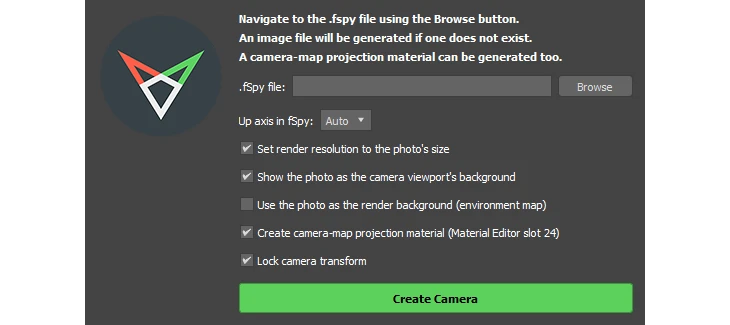
Pick a .fspy file in the window and click Create Camera. The importer creates:
- A matched Physical Camera with fSpy’s position, rotation and field of view. If you moved the principal point in fSpy, the lens shift is set to match.
- The photo as the camera viewport’s background, with the safe frame on. The photo stored inside the
.fspyfile is saved next to it, as a.jpgor.png. - The render resolution set to the photo’s size.
- A projection material (optional) that projects the photo through the camera onto whatever you assign it to. It is a self-lit Camera Map Per Pixel material, placed in Compact Material Editor slot 24.
The whole import is one undo step.
Options in 3ds Max
- Up axis: Auto picks the fSpy axis closest to the camera’s up direction. Choose one yourself if the scene comes in sideways or upside down.
- Render background: use the photo as a screen-mapped environment map for renders.
- True scale: if you set a reference distance in fSpy, the camera comes in at real-world scale in your system units. Without one, 1 unit is 1 meter.
- Lock camera: locks the camera transform so the match can’t be nudged by accident.
To run it without the window:
import lp_fspy_importer_3dsmax
lp_fspy_importer_3dsmax.import_fspy(r"C:\path\to\shot.fspy")