Camera Toolkit for Maya Documentation
Install Camera Toolkit for Maya, bake any camera rig to a clean camera, and use lens presets, the frustum, focus, shake and copy tools.
Requirements
Maya 2025, 2026 or 2027. Tested in Maya 2025 and 2027. Maya 2026 runs the same Python as 2025.
Install
Pick one of the two ways.
A. Drag and drop (recommended)
- Unzip the whole download.
- Start Maya and drag
CameraToolkit_drag_and_drop_install.pyinto a viewport.
Camera Toolkit opens, its CAM button goes on the LP Tools shelf, and it gets an entry in the LP Tools menu. Click the button to open the window. One install covers Maya 2025, 2026 and 2027. In another version, the button appears the first time you start it.
To remove it, choose LP Tools menu > Camera Toolkit > Uninstall.
B. By hand, with two lines of Python
- Copy the whole
lp_camera_toolkitfolder fromCameraToolkit\python\py311(Maya 2025 or 2026) orCameraToolkit\python\py313(Maya 2027) into your Maya scripts folder,Documents\maya\scripts. - Restart Maya, then run these lines in the Script Editor (Python tab):
import lp_camera_toolkit
lp_camera_toolkit.show()
To make a shelf button, select the lines and middle-mouse-drag them onto a shelf.
Update
Drag CameraToolkit_drag_and_drop_install.py from the new download into Maya. It replaces the old version, including a copy you put in your scripts folder by hand. If you installed by hand, replace the files in Documents\maya\scripts and restart Maya. Your settings are kept either way.
Start here
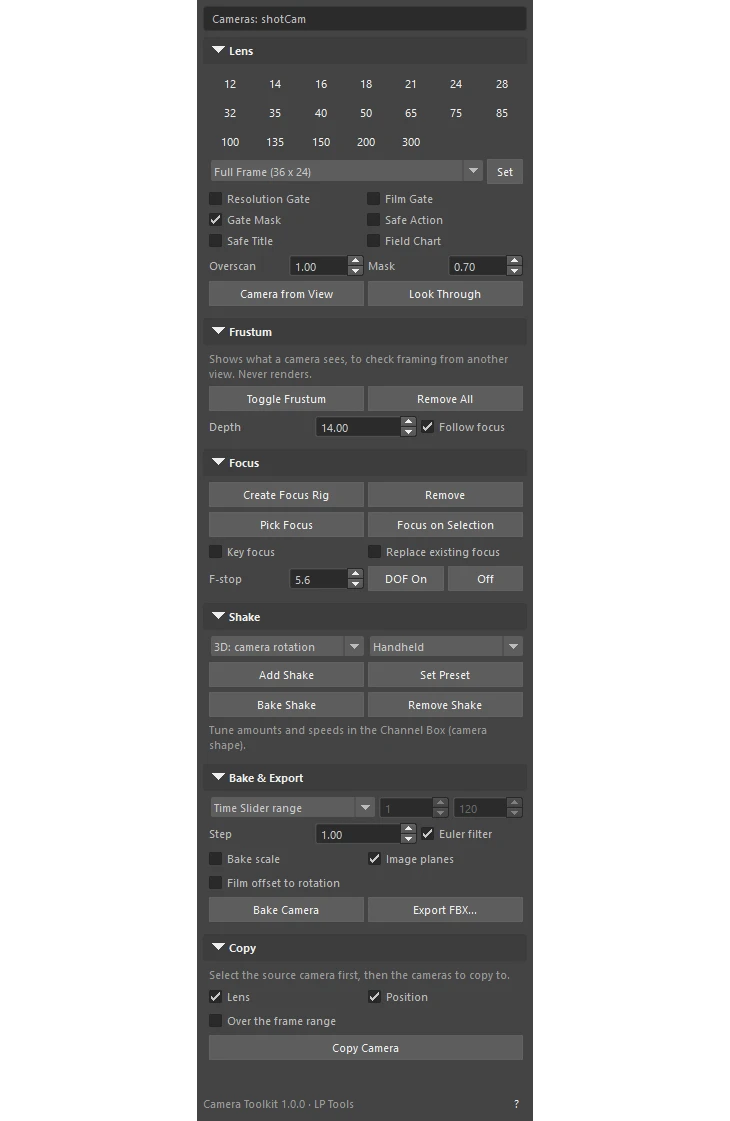
- Every button works on the selected cameras. With no camera selected, it uses the camera you look through (not persp, top, front or side). The bar at the top of the window shows which cameras that is.
- Bake Camera (Bake & Export section) bakes any rig to a new, clean camera at the top of the hierarchy. It handles constraints, aim, motion paths, nested groups, custom pivots and shake. Export FBX bakes and exports in one step.
- The ? button at the bottom of the window explains each section.
What’s in the window
- Bake and Export: bake any rig (aim and parent constraints, motion paths, nested groups, custom pivots, shake) to a new camera at the top of the hierarchy, with animated lens values. Export FBX bakes and exports in one step, ready for Unreal, Unity, Blender, Nuke or Houdini.
- Lens: one-click focal lengths from 12 to 300mm, film back presets (Full Frame, Super 35, ALEXA 35, Mini and Mini LF, V-RAPTOR, VENICE 2, IMAX, APS-C, Micro Four Thirds), gate, mask and safe frame toggles, overscan, and Camera from View.
- Frustum: see exactly what a camera sees from any other view, as a see-through pyramid that follows the lens, film back, film fit and render resolution. It can end at the focus distance to show the focus plane, and it never renders.
- Focus: a focus control in front of the camera that drives Maya’s and Arnold’s focus distance and Redshift’s Bokeh. Pick Focus lets you click any surface in the viewport to focus there. Focus on Selection, optional keys on every pick, DOF on and off, and f-stop are included.
- Shake: procedural shake in 2D (film offset, so the camera does not move) or 3D (turns the camera in its own space, with optional movement for parallax). Presets cover Subtle, Handheld, Walking, Running, Vehicle and Impact. It works on top of existing keys, constraints and aim rigs, and Bake Shake turns it into keys.
- Copy: copy lens settings and, or, position from one camera to others, at the current frame or baked over the frame range.
Seeing what a camera sees
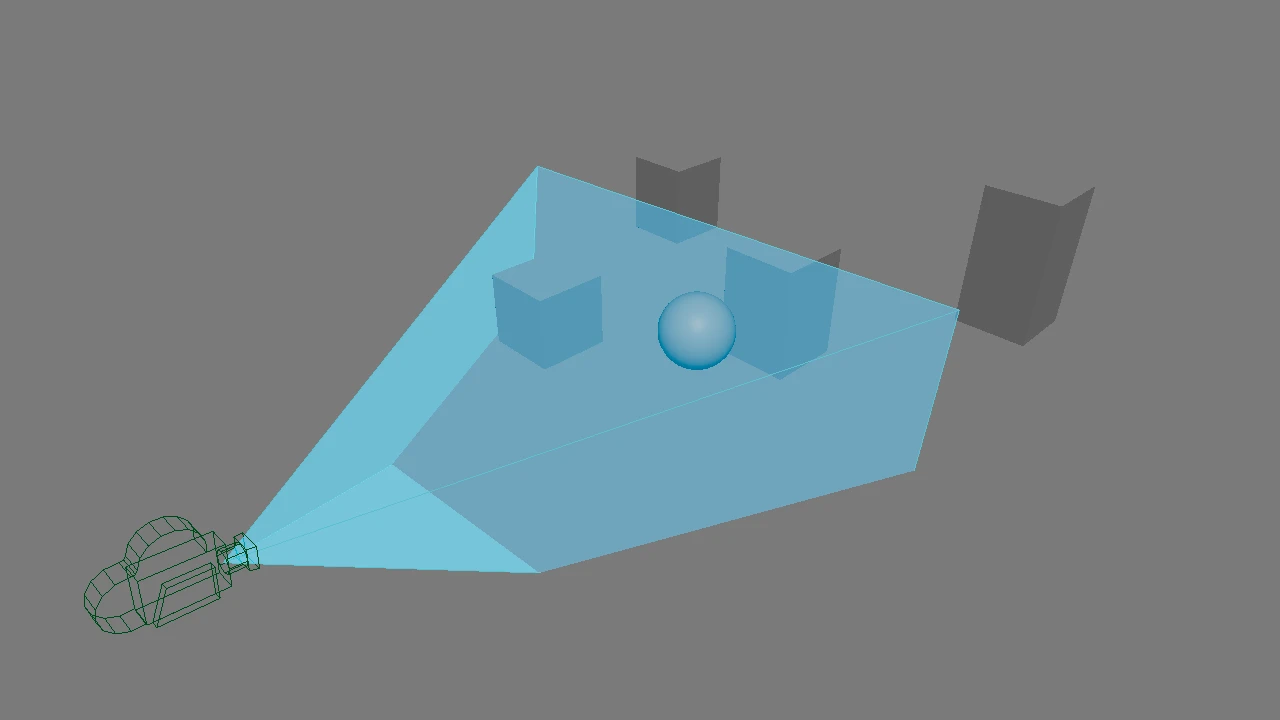
The Frustum section shows a see-through pyramid that follows the lens, film back, film fit and render resolution. It can end at the focus distance to show the focus plane, and it never renders.
Coming from Camera Bake
Camera Toolkit replaces maya_camera_bake.py. You can delete the old file and any shelf button that runs it. Bake Camera does the same job, and now also handles film offsets, image planes and Arnold and Redshift camera settings.
See the Camera Toolkit product page for the full list of lens, focus, shake and copy tools.
Need help? Email support@LPTools.store and include the details listed on the Support page.